

Language & Communication
Languages
Canadian clinics hear many languages in a day. Scribeberry's language picker covers 61 of them plus Auto-detect, so you can transcribe, translate and document visits in the language they happen in.
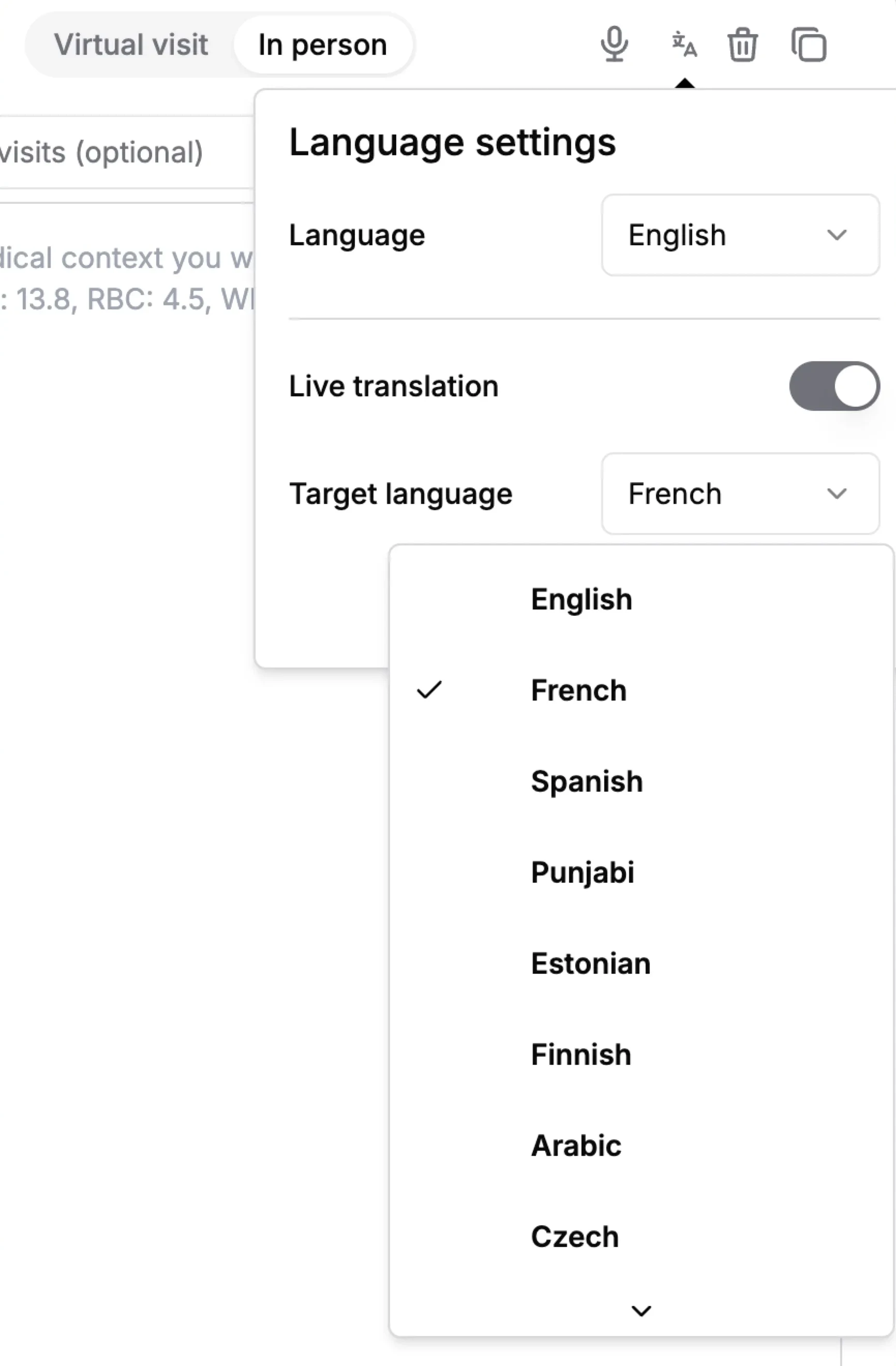
Languages at a glance
- Transcription and translation
- 61 languages, plus Auto-detect
- Structured note output
- English, French, Spanish, German, Portuguese, Arabic and Chinese
- Chinese
- Simplified Chinese, Traditional Chinese and Cantonese
- Setting
- Per visit, in Language settings before recording
- Broadest support
- English and French
What does Languages do for multilingual care workflows?
Scribeberry supports 61 languages for transcription and live translation, plus an Auto-detect option for identifying the spoken language. You choose the visit language in Language settings before recording. Structured notes can be written in seven languages: English, French, Spanish, German, Portuguese, Arabic and Chinese. Quality and available features vary by language, and English and French have the broadest support.
How does Languages fit into your workflow?
Language is set per visit, so you can switch from an English visit to a French one to a translated Punjabi one in the same afternoon.
- Before recording, open Language settings and set My language, or choose Auto-detect where available.
- For a visit in a different language from yours, turn on Live translation and set the Patient's language.
- Record the visit; the transcript is captured in the spoken language.
- Generate the note in your template's language and review it.
When should teams use Languages?
Broad language support matters most for clinics serving diverse communities.
- Bilingual English–French practices in Quebec, Ontario and New Brunswick.
- Urban clinics whose patients speak Punjabi, Mandarin, Cantonese, Tagalog, Arabic or Persian.
- Clinicians who prefer to document in a language other than English.
Which languages are in Scribeberry's language picker?
The full list is: English, French, Spanish, Punjabi, Hindi, Urdu, Gujarati, Bengali, Tamil, Telugu, Malayalam, Marathi, Nepali, Sinhala, Simplified Chinese, Traditional Chinese, Cantonese, Japanese, Korean, Vietnamese, Tagalog, Thai, Khmer, Burmese, Indonesian, Mongolian, Arabic, Persian, Pashto, Hebrew, Turkish, Azerbaijani, Kazakh, Georgian, Russian, Ukrainian, Polish, Czech, Slovak, Slovenian, Croatian, Macedonian, Bulgarian, Romanian, Hungarian, Greek, Maltese, Italian, Portuguese, German, Dutch, Danish, Swedish, Finnish, Estonian, Latvian, Lithuanian, Galician, Afrikaans, Swahili and Xhosa. You can also choose Auto-detect.
How do transcription language and note language differ?
The transcription language is the language spoken in the visit. The note language is the language the chart note is written in. They don't have to match. A visit conducted in Spanish can be documented in English, and a French visit can be documented in French.
Structured templates can be set to write notes in English, French, Spanish, German, Portuguese, Arabic or Chinese. For patient-facing materials in other languages, ask Ask Scribeberry to draft them from the visit.
Why does support vary between languages?
Scribeberry uses several transcription engines and routes each visit to one that supports its language. English and French are supported by the most engines, including on-device options. Other languages use cloud engines that cover them, and some features, such as automatic language detection, depend on the engine in use.
What does multilingual documentation look like in one day?
Illustrative example
A physician in a Montreal community clinic documents a morning visit in French, with a French note for the chart. At noon he sees an Arabic-speaking family, turns on Live translation, and writes the note in French.
In the afternoon he records an English visit with an anglophone patient. Each visit uses the same templates and workflow; only the language settings change.
What should you know about language support?
- Set the visit language before recording; it is locked while recording.
- Quality varies by language, accent and audio. Review transcripts in less common languages carefully.
- Structured notes are written in seven languages; use Ask Scribeberry for patient materials in others.
- Live translation supports communication but does not replace a qualified interpreter.
Frequently asked questions about Languages
Answers about which languages are supported, and for what.
61 languages for transcription and live translation, plus Auto-detect. Structured notes can be written in seven: English, French, Spanish, German, Portuguese, Arabic and Chinese.
Yes. French is fully supported for transcription, translation and note writing, and the app interface is available in French.
Yes. Choose Auto-detect in Language settings, where it is available, and Scribeberry identifies the spoken language.
No. English and French have the broadest support, including more transcription engine options. Other languages are transcribed by engines that support them, and quality varies with language and audio.
Ready to use Languages in your clinic?
Scribeberry helps teams deliver clearer communication and consistent documentation across language contexts.

